
库
一 系统数据库
information_schema: 虚拟库,不占用磁盘空间,存储的是数据库启动后的一些参数,如用户表信息、列信息、权限信息、字符信息等
performance_schema: MySQL 5.5开始新增一个数据库:主要用于收集数据库服务器性能参数,记录处理查询请求时发生的各种事件、锁等现象
mysql: 授权库,主要存储系统用户的权限信息
test: MySQL数据库系统自动创建的测试数据库
information_schema库下的表
1、TABLES表:提供了关于数据库中的表的信息
mysql> use information_schema
mysql> select * from tables limit 1\G
mysql> select * from tables where TABLE_NAME='city'\G

columns表:提供了关于数据库中表的列的信息
mysql> select * from columns\G

STATISTICS表:表索引的信息

COLLATIONS表:提供校验规则和字符集对应关系

Table_catalog    数据表登记目录
Table_schema    数据表所属的数据库名
Table_name    表名称
Table_type    表类型[system view|base table] 系统表 ,数据表
Engine    使用的数据库引擎[MyISAM|CSV|InnoDB]
Version    版本,默认值10
Row_format    行格式[Compact|Dynamic|Fixed]
Table_rows    表里所存多少行数据
Avg_row_length    平均行长度
Data_length    数据长度
Max_data_length    最大数据长度
Index_length    索引长度
Data_free    空间碎片  刚刚用过的暂时不再使用
Auto_increment    做自增主键的自动增量当前值  可以通过导出再导入数据进行释放
Create_time    表的创建时间
Update_time    表的更新时间
Check_time    表的检查时间
Table_collation    表的字符校验编码集
Checksum    校验和
Create_options    创建选项
Table_comment    表的注释、备注

CREATE TABLE student(gid int primary key COMMENT '列注释') COMMENT='表注释';
二 创建数据库
1 语法(help create database)
CREATE DATABASE 数据库名 charset utf8;
2 数据库命名规则:
可以由字母、数字、下划线、@、#、$
区分大小写
唯一性
不能使用关键字如 create select
不能单独使用数字
最长128位
三 数据库相关操作
1 查看数据库
show databases;
show create database db1;
select database();

2 选择数据库
USE 数据库名

3 删除数据库
DROP DATABASE 数据库名;

4 修改数据库
alter database db1 charset utf8;
表
一 存储引擎介绍
存储引擎即表类型,mysql根据不同的表类型会有不同的处理机制
二 表介绍
表相当于文件,表中的一条记录就相当于文件的一行内容,不同的是,表中的一条记录有对应的标题,称为表的字段
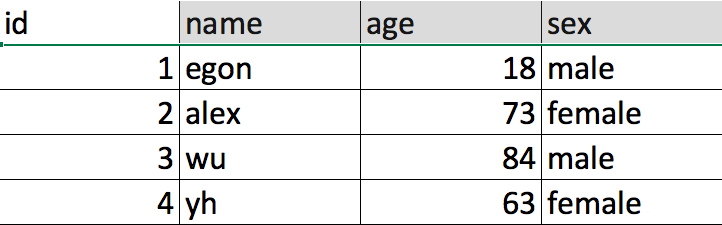
id,name,qq,age称为字段,其余的,一行内容称为一条记录
三 创建表
语法:
create table 表名(
字段名1 类型[(宽度) 约束条件],
字段名2 类型[(宽度) 约束条件],
字段名3 类型[(宽度) 约束条件]
);

#注意:
1. 在同一张表中,字段名是不能相同
2. 宽度和约束条件可选
3. 字段名和类型是必须的
MariaDB [(none)]> create database db1 charset utf8;

MariaDB [(none)]> use db1;

MariaDB [db1]> create table t1(
    -> id int,
    -> name varchar(50),
    -> sex enum('male','female'),
    -> age int(3)
    -> );

MariaDB [db1]> show tables; #查看db1库下所有表名

MariaDB [db1]> desc t1;
+-------+-----------------------+------+-----+---------+-------+
| Field | Type                  | Null | Key | Default | Extra |
+-------+-----------------------+------+-----+---------+-------+
| id    | int(11)               | YES  |     | NULL    |       |
| name  | varchar(50)           | YES  |     | NULL    |       |
| sex   | enum('male','female') | YES  |     | NULL    |       |
| age   | int(3)                | YES  |     | NULL    |       |
+-------+-----------------------+------+-----+---------+-------+

MariaDB [db1]> select id,name,sex,age from t1;
Empty set (0.00 sec)

MariaDB [db1]> select * from t1;
Empty set (0.00 sec)

MariaDB [db1]> select id,name from t1;
Empty set (0.00 sec)

往表中插入数据
MariaDB [db1]> insert into t1 values
    -> (1,'egon',18,'male'),
    -> (2,'alex',81,'female')
    -> ;
MariaDB [db1]> select * from t1;
+------+------+------+--------+
| id   | name | age  | sex    |
+------+------+------+--------+
|    1 | egon |   18 | male   |
|    2 | alex |   81 | female |
+------+------+------+--------+


MariaDB [db1]> insert into t1(id) values
    -> (3),
    -> (4);
MariaDB [db1]> select * from t1;
+------+------+------+--------+
| id   | name | age  | sex    |
+------+------+------+--------+
|    1 | egon |   18 | male   |
|    2 | alex |   81 | female |
|    3 | NULL | NULL | NULL   |
|    4 | NULL | NULL | NULL   |
+------+------+------+--------+
注意注意注意:表中的最后一个字段不要加逗号
四 查看表结构
MariaDB [db1]> describe t1; #查看表结构,可简写为desc 表名
+-------+-----------------------+------+-----+---------+-------+
| Field | Type                  | Null | Key | Default | Extra |
+-------+-----------------------+------+-----+---------+-------+
| id    | int(11)               | YES  |     | NULL    |       |
| name  | varchar(50)           | YES  |     | NULL    |       |
| sex   | enum('male','female') | YES  |     | NULL    |       |
| age   | int(3)                | YES  |     | NULL    |       |
+-------+-----------------------+------+-----+---------+-------+


MariaDB [db1]> show create table t1\G; #查看表详细结构,可加\G
五 数据类型
六 表完整性约束
七 修改表ALTER TABLE
语法:
1. 修改表名
      ALTER TABLE 表名
                          RENAME 新表名;

2. 增加字段
      ALTER TABLE 表名
                          ADD 字段名  数据类型 [完整性约束条件…],
                          ADD 字段名  数据类型 [完整性约束条件…];
      ALTER TABLE 表名
                          ADD 字段名  数据类型 [完整性约束条件…]  FIRST;
      ALTER TABLE 表名
                          ADD 字段名  数据类型 [完整性约束条件…]  AFTER 字段名;

3. 删除字段
      ALTER TABLE 表名
                          DROP 字段名;

4. 修改字段
      ALTER TABLE 表名
                          MODIFY  字段名 数据类型 [完整性约束条件…];
      ALTER TABLE 表名
                          CHANGE 旧字段名 新字段名 旧数据类型 [完整性约束条件…];
      ALTER TABLE 表名
                          CHANGE 旧字段名 新字段名 新数据类型 [完整性约束条件…];
示例:
1. 修改存储引擎
mysql> alter table service
    -> engine=innodb;

2. 添加字段
mysql> alter table student10
    -> add name varchar(20) not null,
    -> add age int(3) not null default 22;

mysql> alter table student10
    -> add stu_num varchar(10) not null after name;                //添加name字段之后

mysql> alter table student10
    -> add sex enum('male','female') default 'male' first;          //添加到最前面

3. 删除字段
mysql> alter table student10
    -> drop sex;

mysql> alter table service
    -> drop mac;

4. 修改字段类型modify
mysql> alter table student10
    -> modify age int(3);
mysql> alter table student10
    -> modify id int(11) not null primary key auto_increment;    //修改为主键

5. 增加约束(针对已有的主键增加auto_increment)
mysql> alter table student10 modify id int(11) not null primary key auto_increment;
ERROR 1068 (42000): Multiple primary key defined

mysql> alter table student10 modify id int(11) not null auto_increment;
Query OK, 0 rows affected (0.01 sec)
Records: 0  Duplicates: 0  Warnings: 0

6. 对已经存在的表增加复合主键
mysql> alter table service2
    -> add primary key(host_ip,port);

7. 增加主键
mysql> alter table student1
    -> modify name varchar(10) not null primary key;

8. 增加主键和自动增长
mysql> alter table student1
    -> modify id int not null primary key auto_increment;

9. 删除主键
a. 删除自增约束
mysql> alter table student10 modify id int(11) not null;

b. 删除主键
mysql> alter table student10
    -> drop primary key;
八 复制表
复制表结构+记录 (key不会复制: 主键、外键和索引)
mysql> create table new_service select * from service;

只复制表结构
mysql> select * from service where 1=2;        //条件为假,查不到任何记录
Empty set (0.00 sec)
mysql> create table new1_service select * from service where 1=2;
Query OK, 0 rows affected (0.00 sec)
Records: 0  Duplicates: 0  Warnings: 0

mysql> create table t4 like employees;
九 删除表
DROP TABLE 表名;
记录
一 介绍
MySQL数据操作: DML
========================================================
在MySQL管理软件中,可以通过SQL语句中的DML语言来实现数据的操作,包括
- 使用INSERT实现数据的插入
- UPDATE实现数据的更新
- 使用DELETE实现数据的删除
- 使用SELECT查询数据以及。
========================================================
本节内容包括:
插入数据
更新数据
删除数据
查询数据
二 插入数据INSERT
1. 插入完整数据(顺序插入)
语法一:
INSERT INTO 表名(字段1,字段2,字段3…字段n) VALUES(值1,值2,值3…值n);
语法二:
INSERT INTO 表名 VALUES (值1,值2,值3…值n);
2. 指定字段插入数据
语法:
INSERT INTO 表名(字段1,字段2,字段3…) VALUES (值1,值2,值3…);
3. 插入多条记录
语法:
INSERT INTO 表名 VALUES
(值1,值2,值3…值n),
(值1,值2,值3…值n),
(值1,值2,值3…值n);
4. 插入查询结果
语法:
INSERT INTO 表名(字段1,字段2,字段3…字段n)
SELECT (字段1,字段2,字段3…字段n) FROM 表2
WHERE …;